Fact sheet
Overview
TickWords reads your chapters, finds the key terminology, and creates a crossword you can play or print. It runs entirely on your own machine, with no cloud service and no language model involved.
Over 400 crosswords ship with it, written and checked across a range of high school and university subjects, with twelve thousand clues between them. Behind those sits a dictionary of 2.7 million terms and the 11.4 million clues written for them, which is what makes a random crossword on any subject possible.
The software also processes your own digital files, PDF through LaTeX, and builds revision crosswords from the facts and terminology inside them. That gives students a practical new tool to support their learning.
Description
For many people crosswords are a relaxing way to study, but building a good one has always been slow and difficult work. TickWords automates it. It scans a document, extracts the important terminology, and generates a tailor-made crossword in seconds.
A printed crossword is a versatile study aid. You can do it during or after reading a
chapter, and it works on a bus or a train where unpacking study materials is not
practical. There is also something inherently social about it. You can ask a friend
Hey, seven down: pairing of electrons responsible for superconductivity, ends in
r?
and they will just join in to solve the puzzle.
While TickWords prints well, there are also advantages to playing in the software:
- Each term can have multiple clues across three difficulty levels, so a subject is worth revisiting at a harder setting.
- Revision crosswords rebuild themselves from the words you skipped, flagged, or took a long time to solve.
- Spaced repetition crosswords help memorise facts, the way flash cards do, but without the flash cards.
By the numbers
Developer
Studio: Reasonetix
Lead programmer: Dr Warren Creemers
Based in: Toowoomba, Queensland
Released
Out now on Steam.
Platforms
- Windows
- Linux
- SteamOS, handhelds included
- macOS, in development
Price
$24.99 USD, paid once, with regional pricing on Steam. No subscription.
Links
Contact
[email protected]
Review keys on request. There is a person on the other end of that address, not a form.
Features
- Over 400 crosswords included, sorted by subject, playable the moment you install.
- Imports PDF, docx, ePub, HTML, Markdown, RTF, ODT, LaTeX and plain text.
- Crosswords for any page range or chapter of an imported document.
- Random crosswords on any subject, generated from a dictionary of 2.7 million terms.
- Three clue difficulties per term, so the same material is worth revisiting.
- Revision crosswords and spaced repetition built from what you got wrong.
- Print to paper or PDF, and export high resolution images for sharing.
- Six hours of study music, 150 tracks across lo-fi, piano, guitar, ambient and zen.
- All processing is local. Documents never leave your computer, and no account is needed.
- Colourblind safe palettes, a high contrast mode and dyslexic font support.
- Steam Cloud keeps crosswords and progress in step across machines, on the Steam version.
Technology
Development history
This software started in 2013 when I needed a glossary generator for my PhD write up. I am a computer scientist, but my research into electrical detection of human emotions was cross-disciplinary, with a lot of medical and psychological depth. Not relishing the idea of combing my 600-odd pages of work for the key terms a reader would need, I wrote my own glossary analysis algorithm.
I soon discovered how powerful glossary analysis algorithms were, and started researching fact extraction techniques. Later that year I experimented with releasing a free crossword generator, and thought it would be excellent if the two things were combined into one product.
I had to put it down for a while. I had started a young family and had to concentrate on my work at CSIRO and the Australian National University. Recently I moved with my family to a rural Queensland town, to live the country lifestyle. Now, ten years after putting this work aside, I am very happy to be picking it up again.
Grappling with jargon
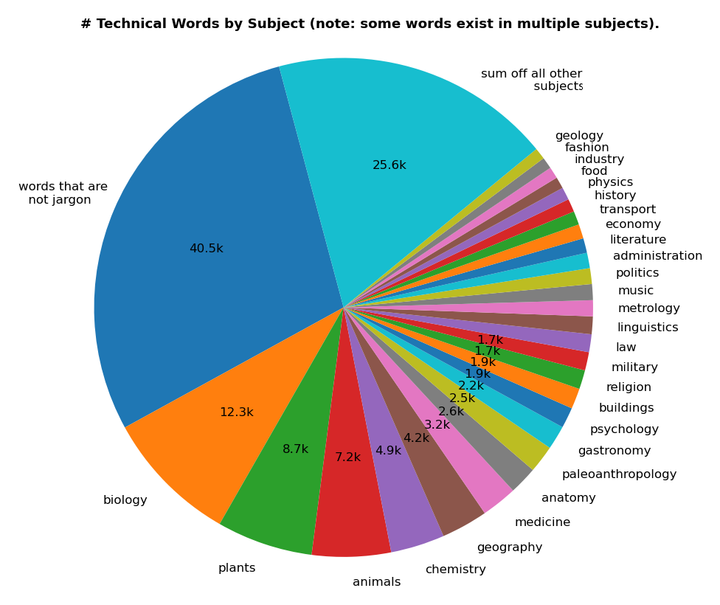
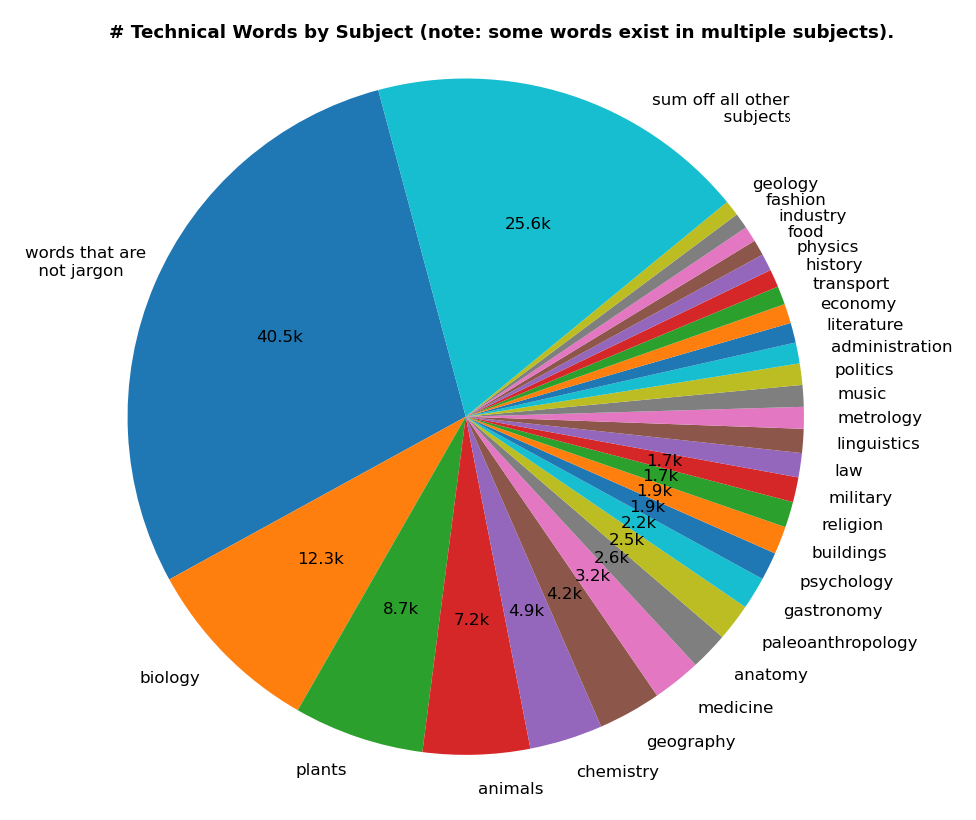
In compiling this work I reviewed ethically sourced public domain datasets used by linguists, such as NLTK and WordNet. That allowed me to refine a set of 126 subjects, or areas of study, and then establish which English words carry a specific meaning inside those domains. The summary is in the chart below, and it is what tells us which students benefit most from this software.
Author's note
This is not another learning app
. It is a tool built by a former lecturer who got sick of
educational software that either treats students like kids who need a dopamine hit, or attempts
to replace teachers. This is not gamified homework. It is a focused, low stress way to actually
remember what you study.
If you are a parent looking for help, you may be confused by the price. It is a fraction of the cost normally charged for educational software. The reason is that this software is priced so students can afford it. Normal educational software positions itself as a substitute for private tuition, and understands you will pay for results. I am not selling to you, so there is no monthly fee. My proposition is that the amount asked is something a senior high school student can justify, as a tool that will aid them until they finish university. My business model is not preying on the bank accounts of concerned parents.
If you are an educational institution, this software can definitely help teachers prepare coursework. There is no site or classroom licence option because this is a tool that helps students organise and perform. It is not intended as a substitute for teaching hours. If you see giving students a crossword as a substitute for contact hours with an educator, or as a way to reduce costs, please go and find other software.
This software is built for you, the student. I sell it on Steam because I believe it is a place where great software can find a following. Steam offers a good refund policy and regionally appropriate pricing, keeping this software affordable and accessible to all. I respect that.
Downloads
The archives are built from the screenshot, branding, store graphics and other media sets. The trailers are offered separately because they are too large to sit inside the kit.
This page and its images (.zip) All images (.zip) Announcement trailer (.mp4) Gameplay trailer (.mp4) EULA (PDF)
Trailers
Announcement trailer
Gameplay trailer
Both trailers are on the press kit page at tickwords.com/press_kit.html, and download links are in the section above.
Screenshots
Every screenshot is downloadable individually below, and in the archives above.
Gameplay clips
Print and export samples
Branding
Logos in SVG and PNG, plus the Krita sources, so layers can be pulled for your own artwork.
Store graphics
Other images
The galleries above are interactive on the web page. Every file in them is in press_kit.zip and media.zip.